Scaling Options
Default settings
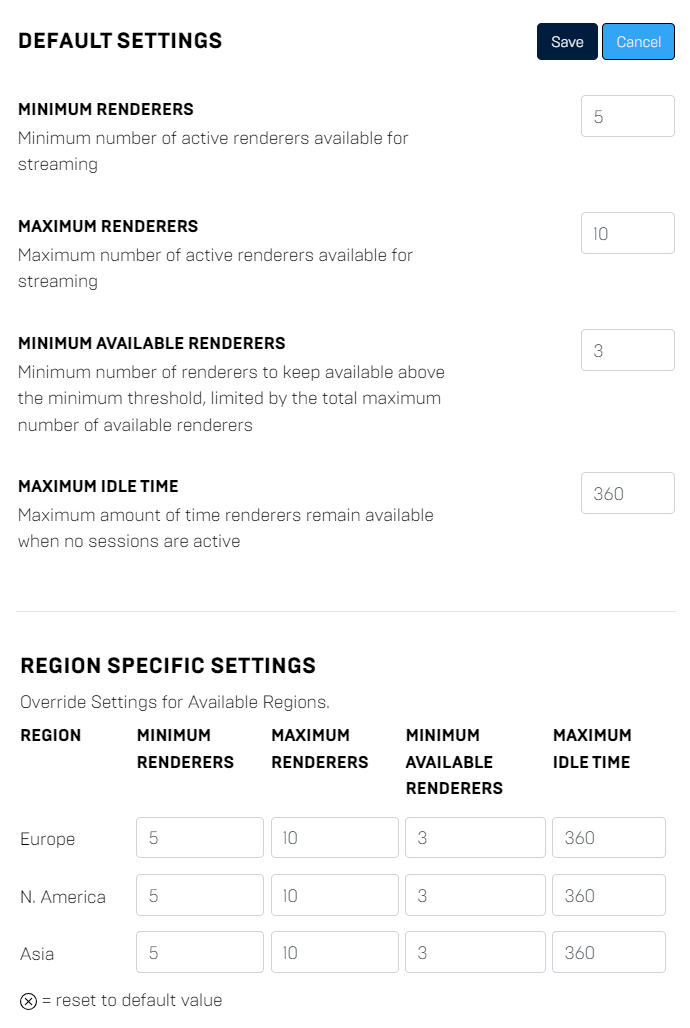
Default settings will automatically set the parameters for all regions.
For development purposes we recommend to use region specific settings otherwise you will scale up instances in all region.
Region specific settings
You can override the default settings for a specific region or only set the parameters for a single region. If you only want to stream in US, you should use this option.
Scaling strategy
On this page you can set up your scaling strategy for your application environment.
In general we differentiate between two possible strategies.
- Direct access
- On demand
Both options have their advantages and disadvantages. Depending on your desired solution you should consider which one fits your needs best.
Direct access
The user can directly access the stream without any waiting time. With the below parameters you can change the threshold how many instances needs to be free and when we will scale up or down for you.
On demand
The user needs to wait for a few minutes to access the stream. The instance will be started on request and takes more or less time depending on your application size and loading time.
Scaling parameters
Scaling parameters can be set globally or region specific. You can also combine both.
Minimum renderers
Minimum number of active renderers available for streaming.
Maximum renderers
Maximum number of active renderers available for streaming
Minimum available renderers
Minimum number of renderers to keep available above the minimum threshold, limited by the total maximum number of available renderers
Maxiumum idle time
Maximum amount of time (in seconds) renderers remain available when no sessions are active
Types of scaling
Dynamic scaling
Scale my application based on demand from users and manages by my scaling settings.
Example: In this case you will run 5 instances in each region and the threshold for available renderers is set to 3.
The system will scale up or down to maintain 3 available renderers in each region, up to the maximum of 10 per region.